AI can now do more than explain geometry problems. It can call Dino-GSP directly to draw geometry and design math animations.
We have launched the Dino-GSP MCP service. Through MCP, AI clients such as Codex, Claude Code, Cursor, VS Code, and other MCP-capable tools can use Dino-GSP as an external tool: create geometry objects, edit board content, design step-by-step demonstrations, export PNG images, export structured projects, and import earlier projects for continued editing.
That changes the role of AI in geometry work. It no longer has to stop at text such as "connect this point", "construct a median", or "drag the point to observe the angle". An AI agent can now perform those operations inside a real geometry tool and bring the result back into content production, teaching explanations, question bank diagrams, interactive courseware, or product workflows.
In one sentence, Dino-GSP MCP is designed to:
let AI agents call Dino-GSP directly for geometry construction, then organize math animations and dynamic demonstrations.
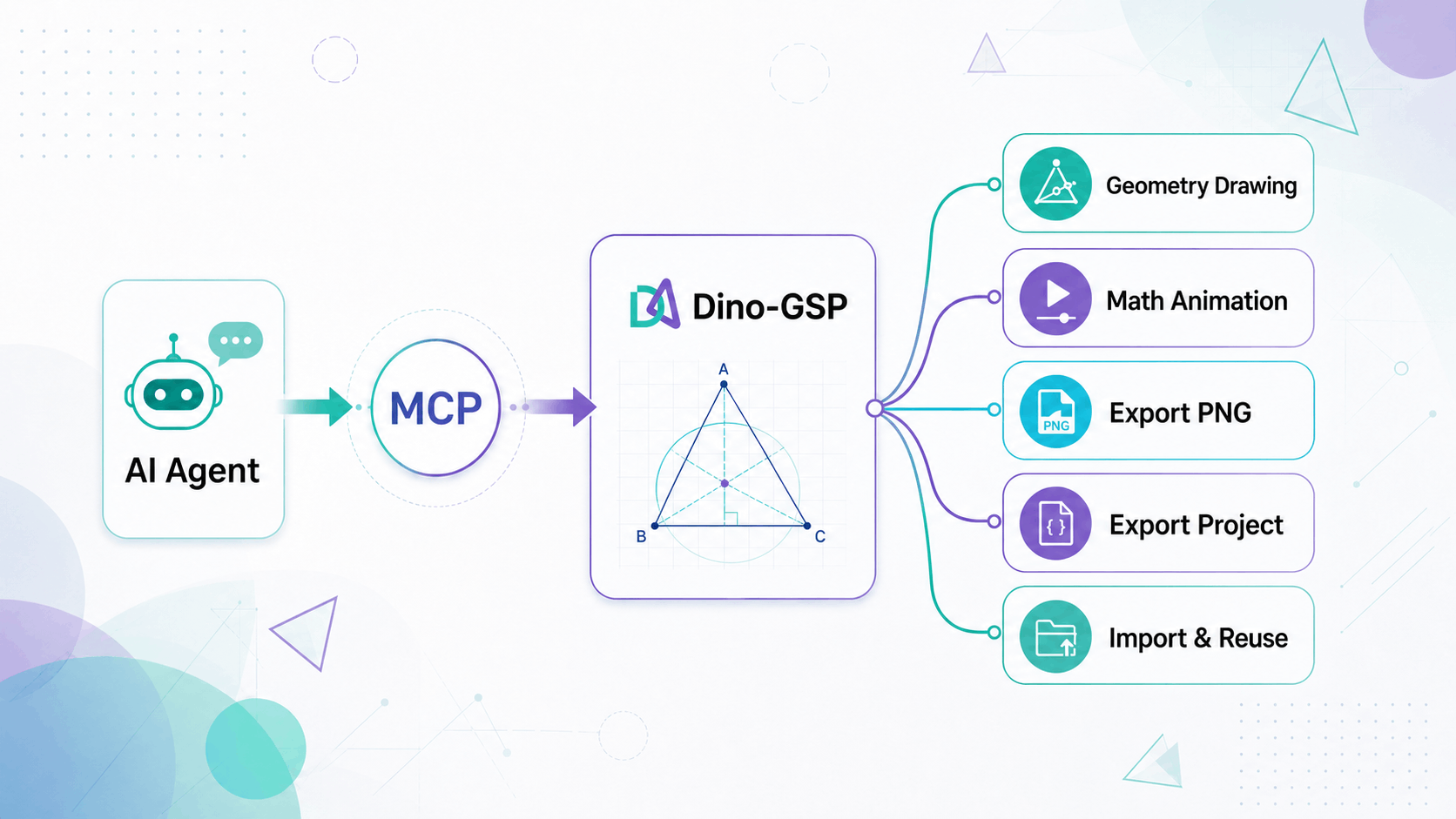
What is MCP?
MCP is a standard way for AI clients to call external tools.
In the past, when we talked to AI, the output was mostly text. It could tell you that the three medians of a triangle meet at the centroid, and it could write down the construction steps, but it could not reliably operate a geometry board or persist the result as an editable project.
With MCP, an AI client can connect to a professional geometry construction capability. When you ask an agent:
Draw triangle ABC, construct its three medians, and mark the centroid G.
the AI does not have to explain the task only in words. It can call Dino-GSP MCP, create points, lines, auxiliary constructions, and labels on the board, then export an image or project data when needed.
That is the most direct value of MCP for geometry: AI can operate geometry.
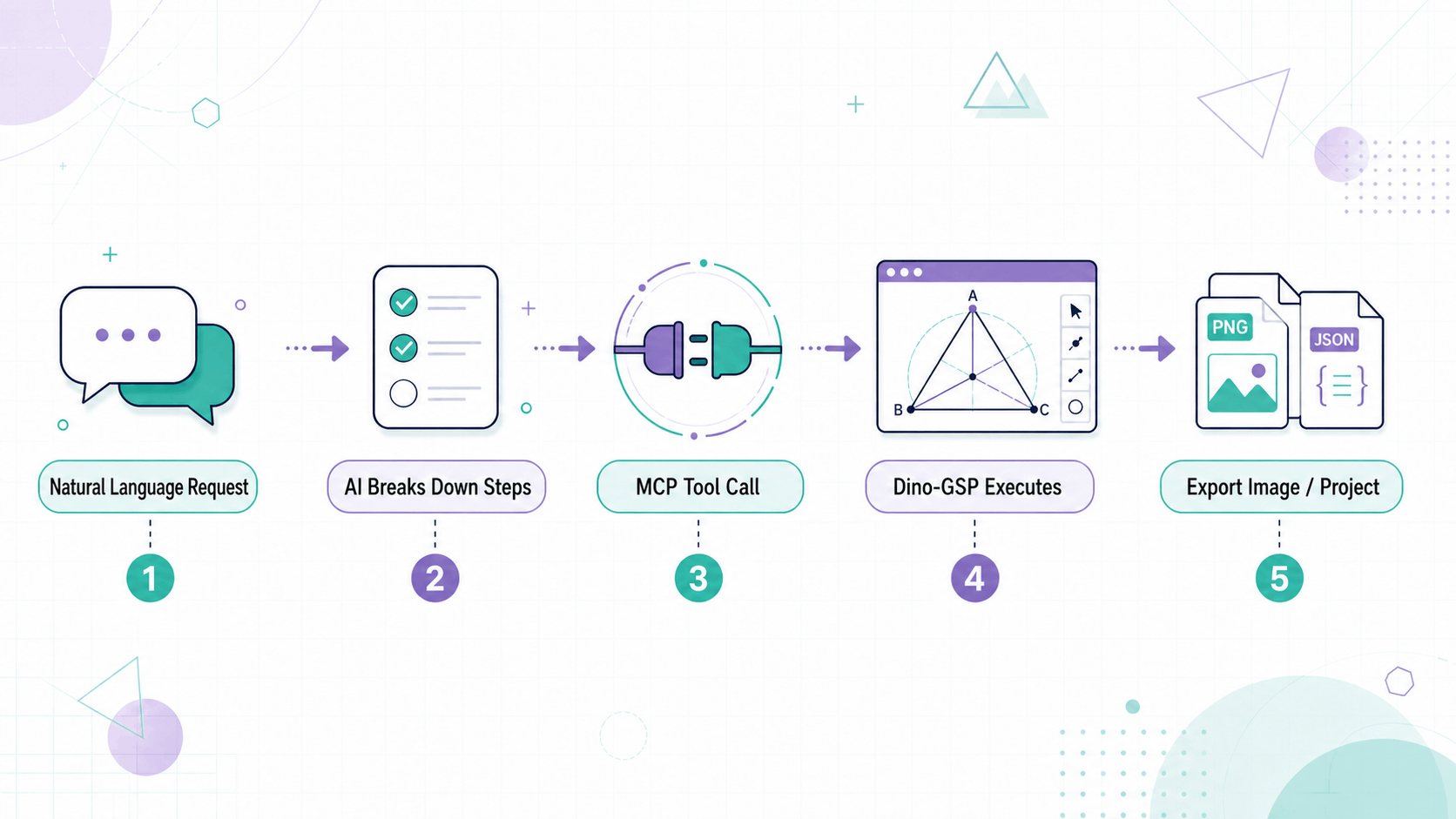
What can Dino-GSP MCP do?
The current Dino-GSP MCP service focuses on five capabilities.
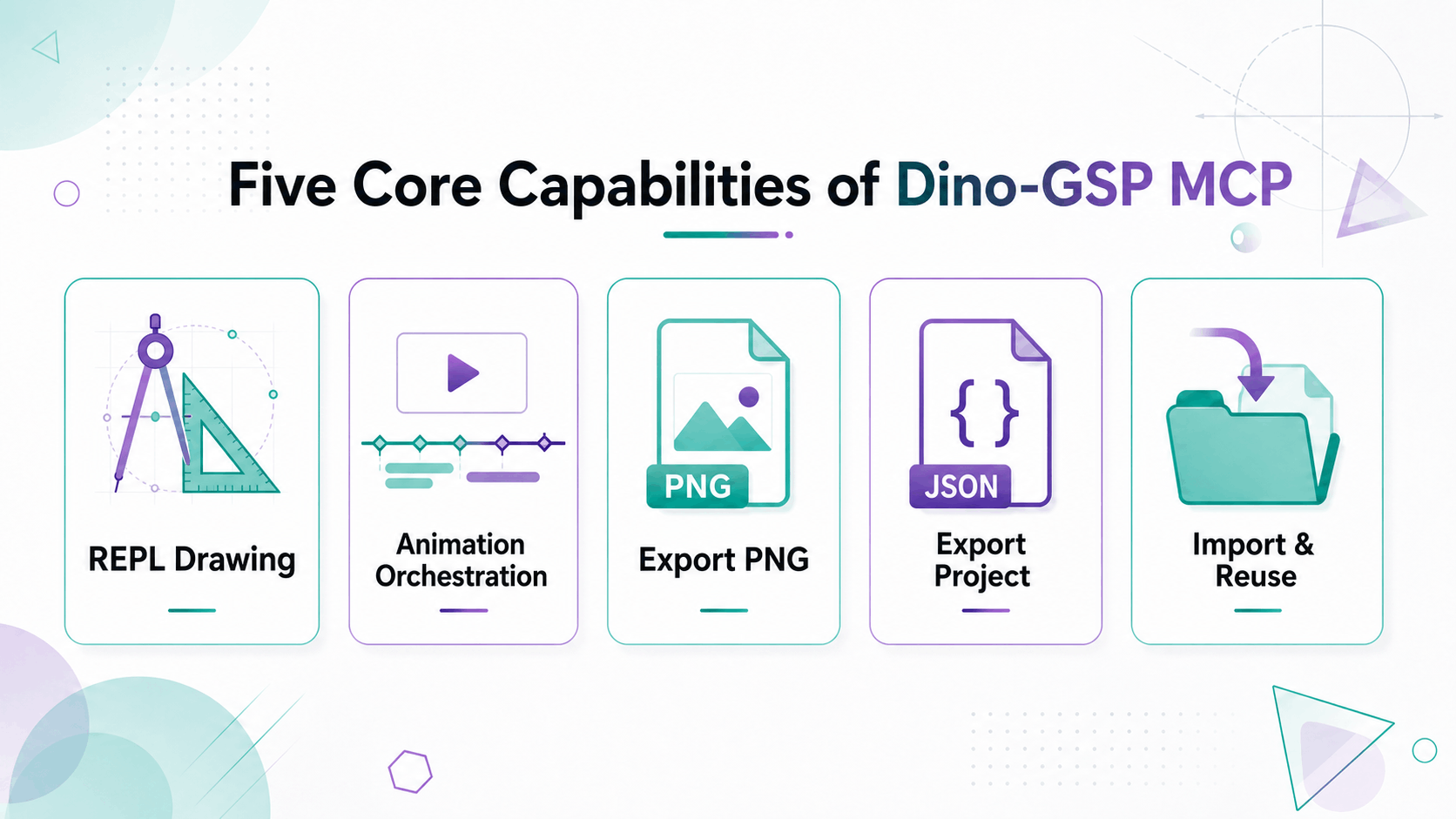
1. Use the geometry REPL for construction and animation orchestration
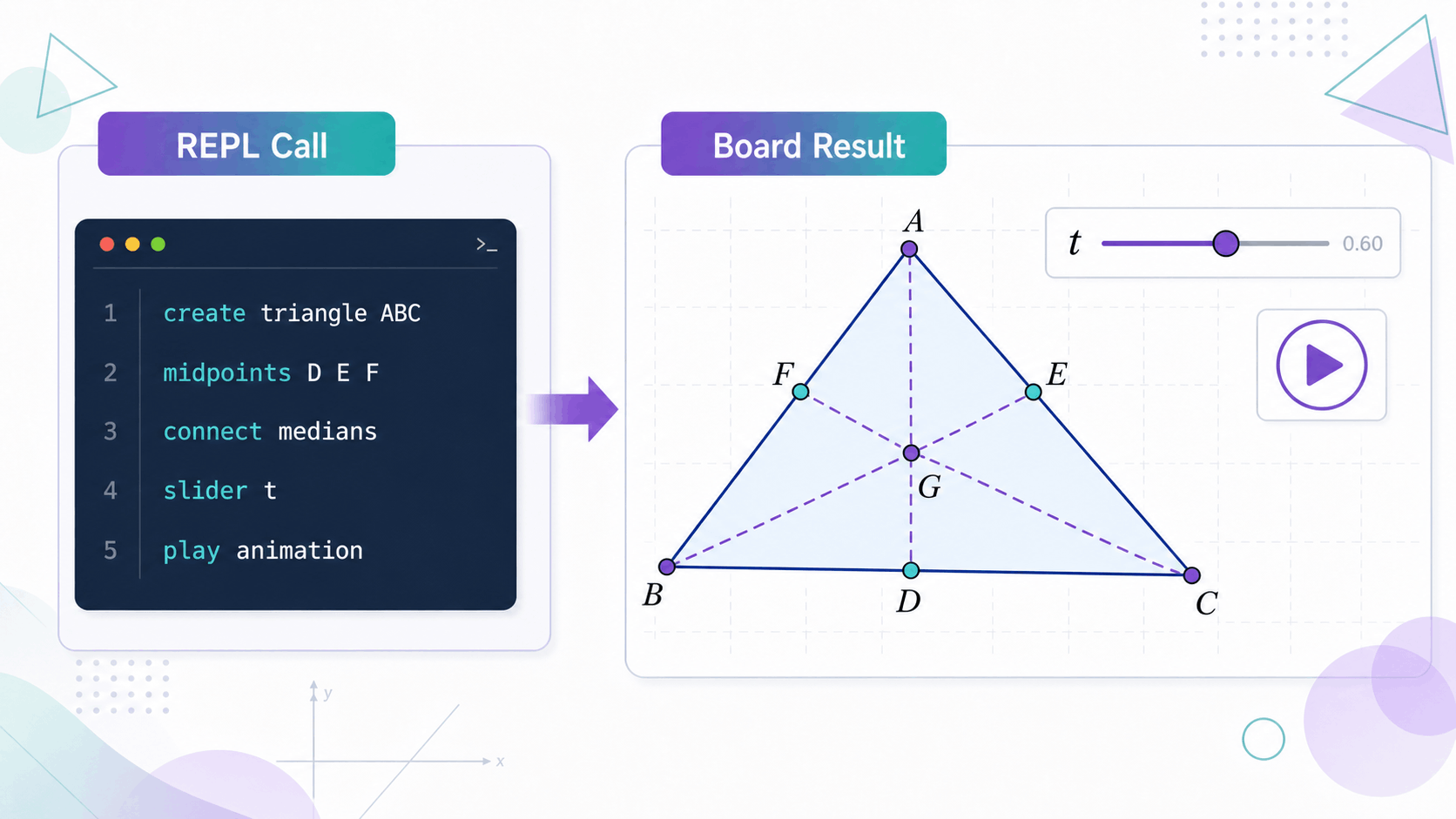
AI can call algeo_repl to use Dino-GSP's interactive command interface. It can create and modify geometry objects, and it can also orchestrate math animations and interactive demonstrations.
The REPL is the command interface of the Dino-GSP board. It covers board management, object definitions, labels and styles, expression evaluation, intersection construction, animation, and interaction controls.
For example, an AI agent can use the REPL to:
- Create triangles, segments, circles, curves, function graphs, and transformation objects.
- Construct midpoints, perpendicular lines, parallel lines, angle bisectors, tangents, intersections, and auxiliary lines.
- Adjust labels, colors, line styles, visibility, and board styles.
- Use
evalto calculate and verify expression results. - Create sliders so points, parameters, or objects change with a variable.
- Create play buttons and use event action sequences to control play, pause, visibility, waiting, and parallel actions.
- Manage multiple boards and split a lesson into several demonstration pages.
This is different from generating a one-off image. The AI is operating structured geometry objects and dynamic control logic. The project can still be edited, extended, annotated, animated, and exported later.
2. Export PNG images
After construction, the agent can call export_image to export a PNG image. These images can be used in slides, handouts, problem explanations, articles, teaching research material, and AI solution reports.
For teachers and content teams, the workflow is direct: describe the geometry figure in natural language, let AI create it, and export a publishable asset.
3. Export structured projects
Besides images, Dino-GSP MCP supports export_project for exporting project JSON.
Images solve distribution. Project export solves reuse. When a geometry figure is saved as a structured project, it is no longer just a screenshot. It becomes an editable geometry asset that can be imported, modified, regenerated, and reused.
4. Import existing projects for continued editing
With import_project, AI can import an existing project into the current MCP session and continue editing on top of it.
For example, if you already have a base triangle diagram, the next session can ask AI to add the circumcircle, altitudes, angle bisectors, or new labels without redrawing the figure from scratch.
5. Organize math animations and dynamic demonstrations
Dino-GSP MCP is not only for static diagrams. It is also useful for generating math animations and dynamic demonstrations.
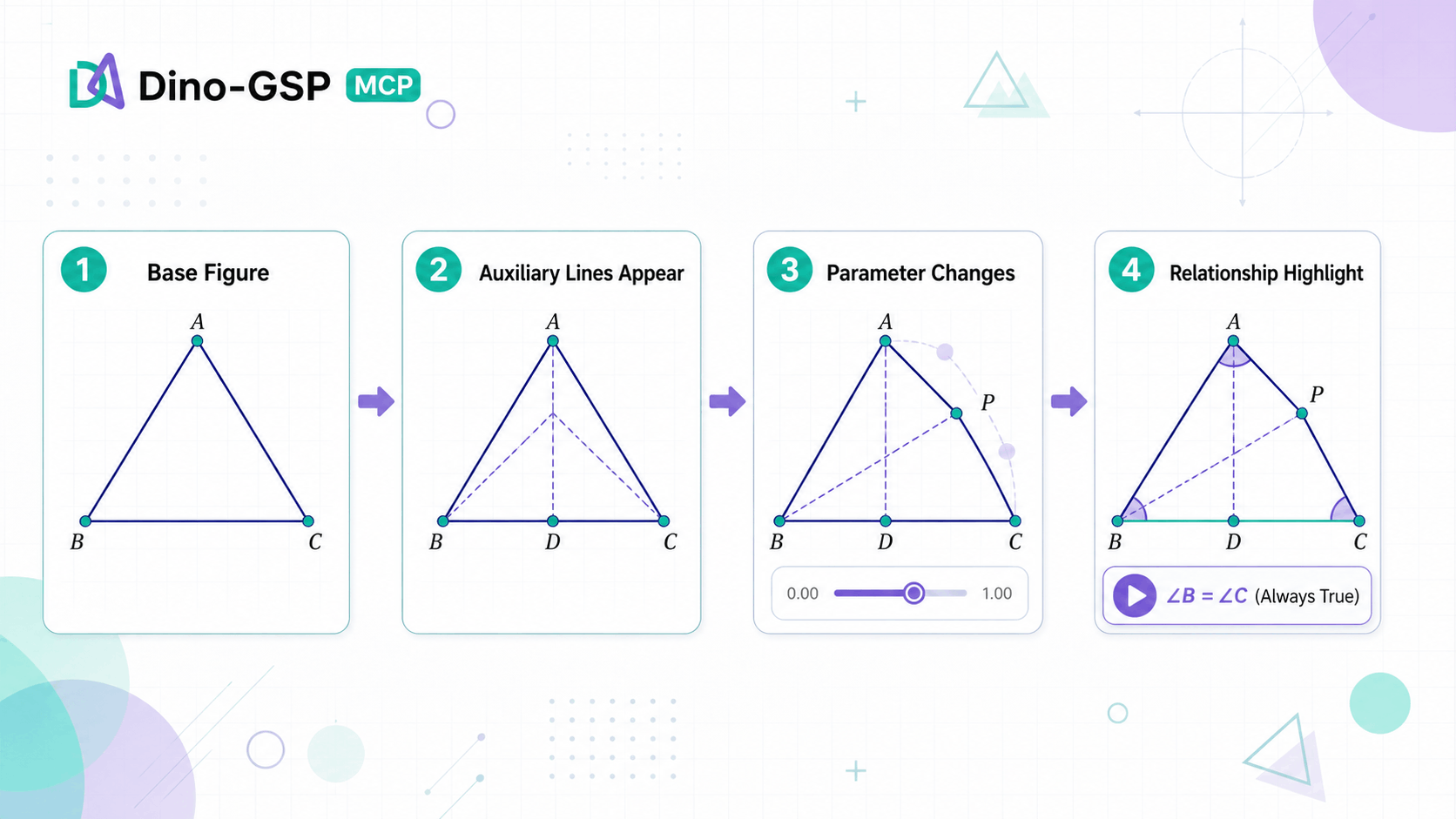
Here, "math animation" does not mean generic video effects. It means a dynamic process built around mathematical objects and relationships: points can move, parameters can change, auxiliary lines can appear step by step, invariants can be observed, and proof ideas can be organized as a sequence of demonstration states.
AI can help design dynamic math content such as:
- Dragging triangle vertices to observe that the medians always meet at the centroid.
- Moving a point on a circle to observe relationships between inscribed angles.
- Moving secants or tangents to demonstrate power of a point relationships.
- Changing a parameter to show how a function graph and geometry intersections move.
- Revealing auxiliary lines step by step so a proof unfolds visually.
Why geometry is a strong fit for MCP
Geometry construction and math animation are a natural fit for AI agents.
Geometry is not plain text. It has clear objects, steps, and state: where points are, which lines connect, which point is the center of a circle, where an auxiliary line starts, which objects appear first, which objects appear later, what moves, what relationship should be observed, what currently exists on the board, and what final output is required.
For the "three medians of a triangle" example, AI can break the task into operations:
- Create triangle ABC.
- Construct the midpoints of BC, CA, and AB.
- Connect each vertex to the midpoint of the opposite side.
- Mark the intersection G of the three medians.
- Export a PNG image.
- Export project JSON if needed.
Previously, these steps had to be done manually or written as a textual explanation. Now they can become real tool calls from an agent to a geometry system.
This is also the key difference between Dino-GSP MCP and ordinary AI image generation. Dino-GSP MCP is not trying to generate a picture that merely looks like a geometry diagram. It creates a geometry project that can be edited, exported, reused, and used for dynamic demonstrations.
Who should use it?
Developers and AI agent users
If you use Codex, Claude Code, Cursor, VS Code, or another MCP-capable AI tool, you can add Dino-GSP MCP to your tool list.
It is a practical way to validate a specific workflow: AI receives a geometry diagram request, completes the construction, exports an image, or saves a project. You can start with a first call from your AI client and then decide whether the capability belongs in a larger product pipeline.
AI math and education product teams
If your product includes geometry problems, AI solving, question bank diagrams, courseware generation, or homework reports, Dino-GSP MCP can become the geometry execution layer in your AI workflow.
The model understands the problem, breaks down the request, and plans tool calls. Dino-GSP draws the points, lines, circles, auxiliary constructions, and labels, then outputs images or project data.
For math animations, AI can split a concept into several demonstration states: show the base figure, add auxiliary lines step by step, then use point dragging or parameter changes to reveal an invariant.
Teachers, teaching researchers, and content teams
If you create handouts, slides, articles, or problem explanations, geometry diagrams are often a small but time-consuming task.
Dino-GSP MCP can turn that task into a prompt:
Call Dino-GSP MCP to draw right triangle ABC with angle C as the right angle. Construct midpoint M of hypotenuse AB, connect CM, label the key points and segments, and export a PNG image.
If you need dynamic courseware or math animation, the request can be written more like a classroom script:
Call Dino-GSP MCP to create circle O with movable points A, B, and C on the circle. Connect AB, AC, and BC, then design a dynamic project for explaining the inscribed angle theorem.
How to start
The Dino-GSP MCP service endpoint is:
https://api.dajiaoai.com/mcp
Authentication uses a Bearer Token. You can get an API key from the Dino-GSP open platform console and configure the request header in an MCP-capable client:
Authorization: Bearer YOUR_TOKEN_HERE
After configuration, start with a simple construction task:
Call Dino-GSP MCP to draw triangle ABC, connect each vertex to the midpoint of the opposite side, construct the three medians, mark centroid G, and export a PNG image.
Reference links:
- MCP integration docs: open.dajiaoai.com/ai/mcp.html
- MCP billing: open.dajiaoai.com/ai/mcp-billing.html
The cost is light enough to try
To lower the barrier for first-time use, Dino-GSP MCP is priced for experimentation.
- Ordinary tool calls such as
algeo_repl,export_project, andimport_projectare about 0.0001 CNY per call. export_imageimage export is about 0.01 CNY per call.
That means a common teaching diagram workflow, even with several construction calls and one image export, is usually very inexpensive.
FAQ
What is Dino-GSP MCP?
Dino-GSP MCP is a geometry construction tool service for AI agents. MCP-capable AI clients can call it to create geometry diagrams, export images, export projects, and import projects.
How is it different from ordinary AI image generation?
Ordinary AI image generation usually outputs a picture. Dino-GSP MCP operates editable geometry projects. Points, lines, circles, auxiliary constructions, parameters, and dynamic relationships remain structured, so they can be modified, demonstrated, exported, and reused.
How is it different from the Dino-GSP SDK?
The Dino-GSP SDK is better suited for embedding a geometry board into a web page or product so users can view, edit, and interact with geometry. Dino-GSP MCP is better suited for letting AI agents call geometry capabilities to construct, modify, export, and read or write projects automatically.
Closing
Geometry has always been one of the hardest parts of AI math.
Models can explain theorems, write proof steps, and describe auxiliary lines. But in real teaching and product scenarios, users need an accurate, clear, reusable geometry diagram. They also need to see how a concept changes, why a relationship stays invariant, and how a proof unfolds step by step.
With the Dino-GSP MCP service, AI agents can directly call Dino-GSP for construction, dynamic demonstration design, image export, and project read/write workflows. Geometry moves from something AI only describes into a content asset that can be created, edited, demonstrated, exported, and reused.
MCP integration docs: open.dajiaoai.com/ai/mcp.html